Stay in the conversation. Leave with the decisions.

It records on your laptop and writes the notes, decisions and actions.

Free in Chrome or Edge, nothing to install. No credit card.

Weekly launch meeting00:00 / 42:00
Your asides stay out of the transcript and the notes.

Your notes, written live

Ready the second you hang up.

Nothing decided yet. Give it a moment.

To do

    Ask this meeting

    42 minutes, replayed in 40 seconds.Every answer links to the minute it was said.Audio stays on your laptop unless you choose otherwise.

    Runs where your calls are.

    Record in your browser, or let the desktop app offer to record when a call starts.

    Google MeetZoomMicrosoft TeamsSlackWhatsApp

    Your fifth call. No fifth write-up.

    Notes, decisions and actions are ready when you hang up, in the meeting’s language. Watch it in 30 seconds.

    Translates, names speakers, cuts the muted asides.

    Translating, naming speakers and cutting the muted asides are done before you open the notes.

    Your meetings, in your language.

    Transcribed in 99 languages, on your laptop, or on MuteNote’s service on a paid plan with meetings kept on your account. The write-up is in the language the call was in.

    The same sample notes in three languages

    Launch is set for 23 March. Ama will send the revised plan by Friday.

    Desktop transcription supports 99 languages. Browser language support depends on the browser.

    Muted means off the record.

    What you say on mute stays out of the transcript and the notes. The other side of the call keeps recording. In Google Meet the extension follows Meet’s mute button; elsewhere, use MuteNote’s own.

    Your mic track while you mute

    Mic on. Your speech is included.

    Meet mute sync is included in Pro and Pro Plus, and available during early access.

    Name a speaker once. Recognise them next time.

    Name a speaker once, with their agreement, and later write-ups name them too. Optional. Their voice stays on your laptop.

    A speaker you named earlier, recognised again
    Speaker 1

    “I’ll send the updated plan on Friday.”

    Remember voices is optional.

    Voiceprints stay on your computer. Only remember people who agree; you can forget their voices any time.

    Stop asking “what did we decide?”

    Ask one meeting or all of them. Every answer links to the moment it was said.

    Try the tabs, tick an action, or follow a time to the words.

    MuteNoteMeeting notes
    Your notes are ready Sample meeting

    Weekly launch meeting

    Tuesday, 10 March42 minutes5 people

    Move the launch to 23 March.

    Also agreed

    Keep current pricing for launch.
    Share the revised plan by Friday.
    14:31 · Ama

    “Let’s give onboarding and payments another week. Shall we move the launch to the twenty-third?”

    Audio saved on your laptop

    Explore the sample notes.

    What was agreed stays in view.

    Each action keeps its owner and date, as said in the call. Open actions carry into the next meeting of the series. MuteNote can remind the owner by email.

    See what you got back.

    Each week MuteNote counts the meetings written up, questions answered and actions tracked, and estimates the time saved, with the arithmetic shown. Counted on your laptop.

    Your audio stays on your laptop.

    Recording and transcription happen on your device, so MuteNote works in meetings where a bot would never be let in. Only if you keep meetings on your account on a paid plan is a recording transcribed by MuteNote’s service, which keeps nothing. Everyone is still asked to agree first. For the notes, choose MuteNote’s service, your own AI, or a local model that keeps everything on the laptop. Hosted AI receives the transcript text, the meeting’s name and the invitee list. It never receives your audio. If you want your meetings on another device, keep them on your account, with or without the recordings; nothing kept there trains any model.

    Read how MuteNote handles your data

    Record for free. Choose who writes the notes.

    Recording and transcription are free on every plan. You pay only for write-ups by MuteNote.

    Prices in USD. Applicable tax calculated at checkout.

    Free

    No subscription

    Your notes, written on your laptop by the AI you already have.

    $0/ month

    Free, no card needed.

    Unlimited recording & transcription
    • 3 hours/month of MuteNote AI notes during early access (sign-in required)
    • Unlimited notes with your own AI or local model
    • Speaker labels and timestamps
    • Your audio stays on your laptop
    Download free

    Your AI provider may charge separately.
    Pay as you go

    No subscription

    A busy month written up for you, paid once.

    $7paid once

    No automatic renewal.

    5 hours of notes written by MuteNote
    • No separate AI account or setup
    • Buy another pack when you need it
    • Unused hours expire at the end of the calendar month you buy them in
    Get it in the app

    14-day pack refund, used or not.

    Pro Plus

    For meeting-heavy weeks

    Three times the hours, for weeks that are mostly meetings.

    $40/ month

    $40 billed monthly.

    45 hours of AI notes each month
    • Everything in Pro
    • 3× the monthly AI notes allowance
    • The same privacy and AI choices

    Renews until cancelled. Cancel in the app.

    How to buy a one-off pack

    In MuteNote, open Settings and sign in under Account. Then choose the 5-hour pack for $7. You pay once and the pack doesn’t renew.

    Download free

    Need more hours on Pro or Pro Plus?

    Add 20 hours for $20 in the app. Top-ups expire at the end of the calendar month you buy them in. Automatic top-ups are optional.

    What counts as an AI hour?

    The allowance covers notes written by MuteNote’s service, not recording or transcription. Usage is metered by processing cost, so an hour of meeting uses roughly an hour of allowance.

    Before your next call.

    How much time does it actually save me?

    MuteNote counts each week’s write-ups, questions answered and actions tracked, and estimates 10 minutes saved per write-up and per question. The arithmetic is on your home screen and never leaves your laptop.

    Does my team need accounts for this to help them?

    No. Only the person recording needs MuteNote. Notes and actions go out as ordinary emails, Jira issues or Slack messages, and reminders as plain emails.

    Do I need to connect a calendar first?

    No. Record your next call, even one with no invitation. A calendar is optional. It names recordings after the meeting and lets MuteNote offer to record when one starts.

    Does a bot join my meeting?

    No. MuteNote records the audio on your laptop and doesn’t announce itself, so tell participants you’re recording and get the consent you need.

    What can I use for free?

    Recording, transcription and notes written with your own AI are free today; your AI provider may charge separately. Signed in, you also get 3 hours a month of MuteNote AI notes during early access, an allowance that can change or end.

    Browser or desktop app: which should I use?

    Start in your browser: Chrome or Edge on any laptop, including a Mac or a locked-down work machine, with nothing to install. It records calls that run in a browser tab (Meet, Teams and Zoom on the web) and keeps everything in that browser. The desktop app for Linux and Windows also records calls in any app, notices when a call starts and offers to record, and starts with your laptop. There is a Mac waitlist.

    Do my meetings train an AI model?

    MuteNote’s notes service doesn’t use your meetings to train AI. Hosted AI processes transcript text; retention depends on your chosen provider. See the privacy policy for details, or use a local model to keep everything on your device.

    Here when you need help.

    Questions or something not working? Contact MuteNote at [email protected].

    Try it with a refund promise.

    Ask within 14 days of your first subscription payment for a full refund. Packs and top-ups are refundable within 14 days, used or not.

    Read the refund policy

    Try it on your next call.

    MuteNote takes the notes, keeps the actions and answers the questions after.

    Prefer the Microsoft Store or the Snap Store? Those listings are in review. The installers here are the same builds.

    On a phone? Open this page on your laptop to record a call.

    Join the Mac desktop waitlist

    Get an email when the Mac app is ready. Until then, use MuteNote in your browser.

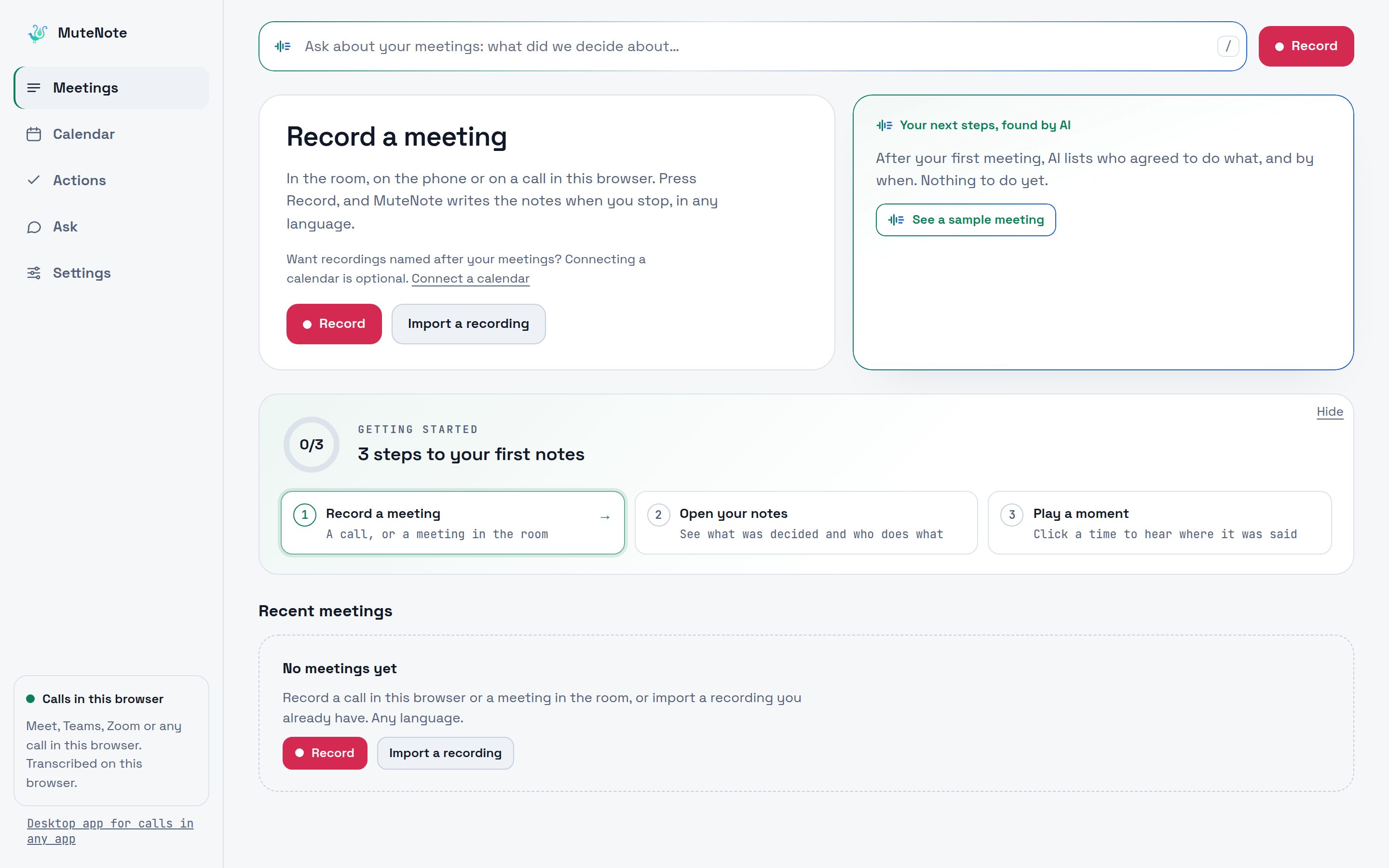
    MuteNote in the browser before the first meeting: Record, Import a recording and the three steps to the first notes
    The browser app before your first meeting. Press Record, and the notes are ready when you stop.